Direct Search Hub
Quick Coverage Finder (All 10 Asia-Pacific Destinations)
Covered Destinations & Major Cities across Asia-Pacific
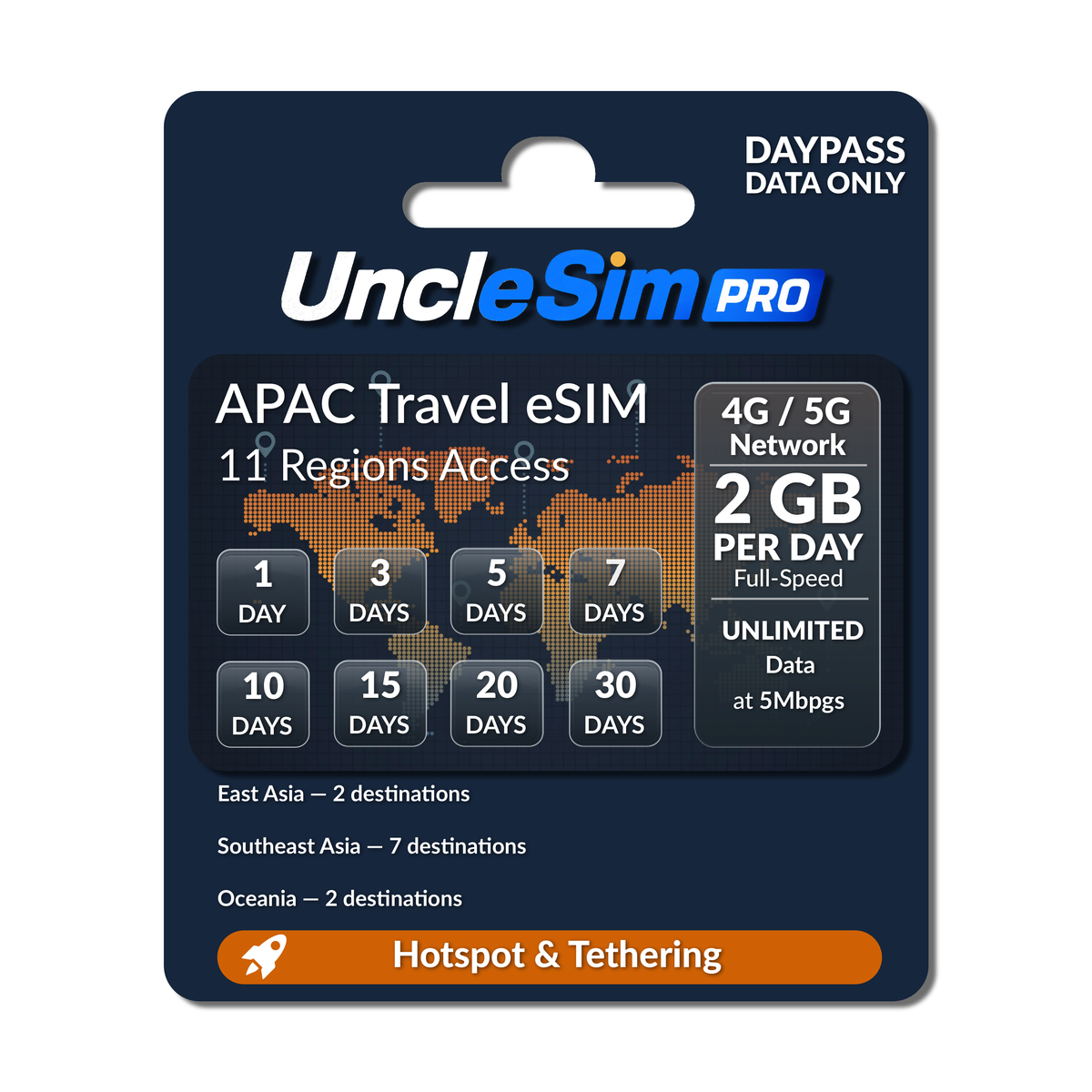
Japan (日本) - Tokyo, Osaka, Kyoto, Hokkaido, OkinawaKorea (韓國) - Seoul, Busan, Incheon, JejuSingapore (新加坡) - Changi, Marina BayMalaysia (馬來西亞) - Kuala Lumpur, Penang, Johor BahruIndonesia (印尼) - Bali, Jakarta, SurabayaThailand (泰國) - Bangkok, Phuket, Chiang Mai, PattayaPhilippines (菲律賓) - Manila, Cebu, Boracay, PalawanVietnam (越南) - Hanoi, Ho Chi Minh City, Da NangCambodia (柬埔寨) - Phnom Penh, Siem Reap / Angkor WatAustralia (澳大利亞 / 澳洲) - Sydney, Melbourne, BrisbaneNew Zealand (紐西蘭) - Auckland, Queenstown, Christchurch
Compatibility Guide
Check if Your Phone Supports eSIM
Fast Dial Code (Universal)
Open your phone app and dial *#06#. If an "EID" barcode or 32-digit number appears, your device hardware supports eSIM!
Apple iPhone Verification
Go to
Settings Cellular. If you see the option "Add eSIM" or "Add Cellular Plan", your iPhone is eSIM ready.Samsung & Android Verification
Go to
Settings Connections SIM Manager. Look for "Add eSIM" or a [+] button to download a profile.
Important Device Notice: Your phone must be carrier-unlocked (SIM-lock free). (Note: Dual-physical SIM iPhones manufactured for Mainland China, Hong Kong, and Macau do not support eSIM).
Easy Setup Process
How to Order, Redeem & Activate Your Asia-Pacific eSIM
1
Select Travel Plan Duration
Choose the number of travel days needed for your multi-region Asia-Pacific trip and complete checkout online.
2
Receive Your Email Voucher within 12 Hours
Check your inbox for our confirmation email containing your unique Redemption Code (Valid for 18 months from purchase).
3
Redeem & Scan QR Profile (On Departure Day)
On your departure day, visit the exchange portal to input your code and generate your eSIM QR profile. Scan it using your phone's cellular settings on stable Wi-Fi.
4
Connect in Asia-Pacific & Enable Roaming
Upon landing in any covered destination, set this eSIM as your Mobile Data line, turn on Data Roaming, and enjoy instant 5G/4G connectivity!
Redemption Portal:https://esimexchange.com/
(Enter your email voucher code to retrieve your Asia-Pacific QR profile)
Carrier Directory
Carrier Specs by Destination (10 Destinations)
Click to View Complete Network Breakdown for Asia-Pacific (5G / 4G / 3G)
| Region / Territory | Operator(s) | Speed |
|---|---|---|
| 1. Japan (日本) | Rakuten, Softbank, Docomo, KDDI | 5G/4G |
| 2. Korea (韓國) | SK Telecom, LG, KT | 5G/4G |
| 3. Singapore (新加坡) | Simba, Starhub | 5G/4G |
| 4. Malaysia (馬來西亞) | Digi, Celcom, U Mobile | 5G/4G |
| 5. Thailand (泰國) | AIS, True Move | 5G/4G |
| 6. Indonesia (印尼) | Telkomsel, XL (4G), Indosat | 5G/4G |
| 7. Philippines (菲律賓) | Globe, Smart | 5G/4G |
| 8. Vietnam (越南) | Vinaphone | 4G/3G |
| 9. Cambodia (柬埔寨) | Metfone, Smart | 4G/3G |
| 10. Australia / 澳大利亞 (Australia) | Telstra | 5G/4G |
| 11. New Zealand / 紐西蘭 (New Zealand) | Spark | 5G/4G |
Got Questions?
Frequently Asked Questions
How do date duration and daily data resets work?
• Duration: 24 hours (any time less than 1 hour will be rounded up to 1 hour) / 天數:24小時(不足1小時按1小時計).
• Reset: 00:00 (UTC+8) / 重置:東八區0:00 (UTC+8).
Can I use one eSIM across multiple regions in one itinerary?
Yes! This eSIM automatically switches across Tier-1 networks in Japan, Korea, Singapore, Malaysia, Indonesia, Thailand, Philippines, Vietnam, Cambodia, Australia, and New Zealand without needing to scan new profiles.
Can I use personal hotspot and tethering?
Yes, personal mobile hotspot and data sharing are fully supported across all covered Asia-Pacific destinations for laptops, iPads, tablets, and companion devices.
Important Precautions for Your Asia-Pacific eSIM
18-Month Code Validity: The digital redemption code received in your email is valid for 18 months from issuance date.
180-Day Activation Window: Once redeemed into a QR profile, it must be activated in a covered destination within 180 days (expires automatically thereafter).
Duration (天數計算): 24 hours per day, any time less than 1 hour rounds up to 1 hour (24小時計算,不足1小時按1小時計).
Reset Time (重置時間): 00:00 UTC+8 (東八區0:00). Daily data quotas refresh daily at 00:00 UTC+8.
Single Phone Lock: Each QR code binds permanently to one device only. Once scanned and bound, it cannot be transferred, replaced, or refunded.
Quick Device Installation
iOS & Android Configuration Guide
Apple iPhone Setup
iOS Guide
Phase 1: Before You Fly (At Home / Wi-Fi)
1. Scan QR: Go to
Settings Cellular tap Add eSIM (or Add Cellular Plan) scan your QR code.
2. Label Lines: Keep your primary SIM labeled as [Primary]. Label this travel eSIM as [Secondary] (or APAC Travel).
3. Line Settings: Set Default Line& iMessage / FaceTime to [Primary] (to continue receiving bank OTP SMS).
Keep the [Secondary] eSIM line turned OFF before departure to prevent premature activation.
Phase 2: After Landing in Asia-Pacific
1. Enable Travel Line: Turn ON your [Secondary] eSIM line.
2. Switch Data: Set Cellular Data to [Secondary].
3. Roaming On: Inside the [Secondary] settings, toggle Data Roaming to ON.
✓ Keep "Allow Cellular Data Switching" turned OFF.
Android Setup
Samsung / Pixel / Unlocked
Phase 1: Before You Fly (At Home / Wi-Fi)
1. Download Profile: Go to
Settings Connections SIM Manager tap [+] Add eSIM scan QR.Keep the new eSIM turned OFF before departure to avoid premature activation.
Phase 2: After Landing in Asia-Pacific
1. Activate eSIM: Turn ON the Asia-Pacific travel eSIM profile.
2. Set Primary Mobile Data: Set the travel eSIM as your preferred Mobile Data SIM.
3. Enable Roaming: Enable Data Roaming in Mobile Network settings.
4. Retain Home Line: Keep your home physical SIM active for SMS/OTPs without mobile data.