Skip to product information
1 of 2

Lucky2

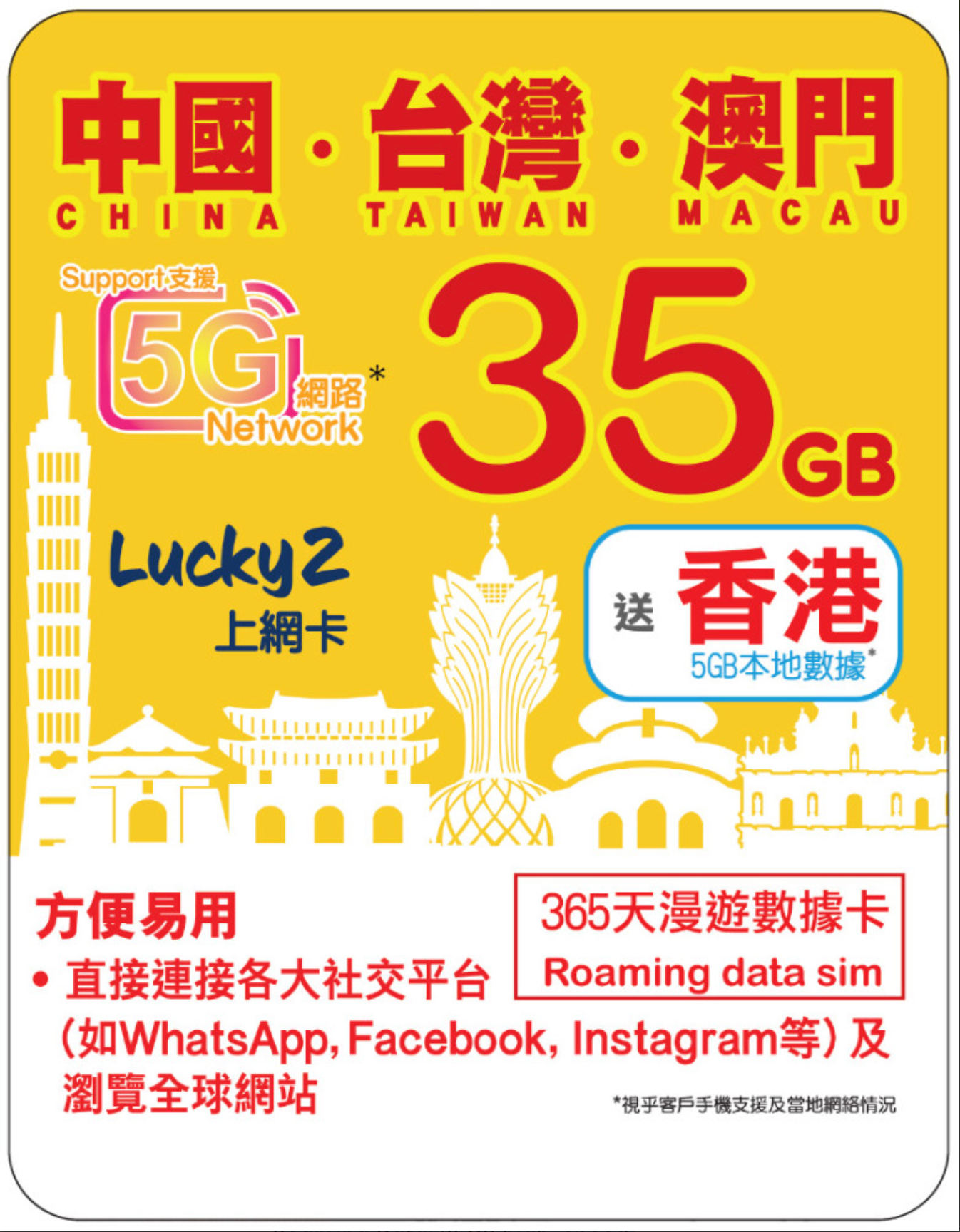
365 Days | China/Taiwan/Macau Roaming Data 40GB + HK Data 5GB | 365天 | 中國、台灣、澳門 漫遊數據 40GB + 香港數據 5GB

365 Days | China/Taiwan/Macau Roaming Data 40GB + HK Data 5GB | 365天 | 中國、台灣、澳門 漫遊數據 40GB + 香港數據 5GB

Regular price ¥174.00 CNY
Regular price Sale price ¥174.00 CNY
Sale Sold out
Taxes included. Shipping calculated at checkout.
Quantity
Multi-Region eSIM
✓ eSIM Only

Multi-Region eSIM
40GB Roaming Data + 5GB Hong Kong Data

Prepaid eSIM covering China, Taiwan, Macau, Hong Kong, valid for 365 days (1 year), plus 5GB of Hong Kong local data. Data-only service: voice calls are not included.

4G / 5G Network
Plug and play
eSIM Only
Installed straight to your phone
Hotspot & WiFi Sharing
Share data with other devices
Data Only
Voice calls are not included
Validity
365 days (1 year)
Validity
One Day Means
00:00-23:59
Hong Kong time, part-day = 1 day
Data
5GB
per this plan
Digital eSIM - your QR code arrives by email
We sell eSIM only - no physical SIM card is supplied. Your plan arrives as a QR code by email and you install it on your own phone.
Coverage

Covered Destinations

As listed Destinations
China 中國Taiwan 台灣Macau 澳門Hong Kong 香港
Everyday Use

What You Can Use It For

Social platforms work directly
WhatsApp, Facebook and Instagram can be used directly
Popular China apps supported
WeChat, Alipay, Didi, Meituan, Xiaohongshu, Douyin, Amap
Browse websites worldwide
Global websites are accessible
Compatibility

Check Your Device Supports eSIM

Fast dial code
Dial *#06#. An EID barcode or 32-digit number means your device supports eSIM.
Apple iPhone
Settings -> Cellular. If you see Add eSIM or Add Cellular Plan, your iPhone is eSIM ready.
Samsung & Android
Settings -> Connections -> SIM Manager. Look for Add eSIM or a [+] button.
Notes: the plan works on 3G / 4G / 5G phones, 5G / 4G service needs a device supporting the relevant bands (for example an iPhone or iPad on iOS 16.4 or later), and network service depends on the carrier's coverage and system compatibility.
Activation

How to Activate Your eSIM

1
Order online
Choose this plan on unclesim.net and check out.
2
Receive your eSIM QR code
We redeem the plan for you when you order and email your eSIM QR code.
3
Scan it, then switch on roaming
Scan the QR code in your phone's cellular settings while on Wi-Fi. When you arrive, turn the line on and enable data roaming.
Our service We redeem the plan for you and email the QR code
QR code delivery Emailed to the address you provide
Specifications

Plan Specifications

Network 5G / 4G LTE / 3G
Data allowance 45GB total: 40GB roaming plus 5GB Hong Kong local
Maximum download Up to 200 Mbps
Maximum upload Up to 50 Mbps
APN mobile (set automatically)
Validity 365 days (1 year)
How a day is counted Hong Kong time (GMT+8) 00:00-23:59; part of a day counts as a full day
Carrier selection The system assigns a carrier automatically based on the available resources
Real-name registration Real-name registration is required before you use the service in Taiwan or Hong Kong: https://rnr2.luckysim.com.hk
eSIM installation One install only - cannot be moved to another device
Questions

Frequently Asked Questions

When does my plan start?

We redeem the plan for you when you order and email your eSIM QR code. Terms of activation are confirmed with your order.

Can I share data with my laptop?

Yes - mobile hotspot can be switched on.

Do I need to register my name?

Real-name registration is required before you use the service in Taiwan or Hong Kong: https://rnr2.luckysim.com.hk

Do you sell a physical SIM card?

No - we sell eSIM only and do not supply a physical SIM card. Your plan is delivered as a QR code and installed on your own phone.

Can I install this eSIM on a second device?

No - an eSIM can only be installed once and cannot be transferred to another device.

Do I need to change my SIM?

No. The eSIM sits alongside your normal SIM; keep your number for calls and messages.

Is there a refund if I do not use it?

No - purchases are non-refundable once confirmed.

Important Information - Multi-Region eSIM

How a day is counted:Days are counted by Hong Kong time (GMT+8), 00:00 to 23:59. Part of a day counts as a full day.
eSIM installs once only:confirm your phone supports eSIM before buying; an eSIM can only be installed once and cannot be transferred to another device.
No refunds or exchanges:purchases and top-ups are non-refundable once confirmed, and eSIMs are not exchangeable after purchase.
Voice calls:This plan is data-only; voice calls are not included.
Real-name registration:Real-name registration is required before you use the service in Taiwan or Hong Kong - portal https://rnr2.luckysim.com.hk (individual or company/corporate; iAM Smart supported; registration status and records can be checked on the same site).
Speed and coverage vary:Actual speed depends on the network at the time, hardware and software; network availability, coverage and quality are affected by many factors.
Carrier panel can change:Roaming carriers can be added, removed or changed at any time to maintain service quality, without notice.
Device and APN settings:The plan works on 3G / 4G / 5G phones and must be used with the specified settings, including the APN above.
Improper use:The service can be permanently suspended, without refund, if the service is used improperly or contrary to Hong Kong law.
Installation

iOS & Android Configuration Guide

Apple iPhone setup
iOS
Phase 1: install at home, on Wi-Fi
1. Scan the QR: Settings -> Cellular -> Add eSIM -> scan.
2. Label the lines: keep your own SIM as [Primary], name this one [Secondary].
3. Keep the travel line OFF until you arrive.
Phase 2: after you land
1. Turn ON the travel eSIM line.
2. Set Cellular Data to that line.
3. Turn Data Roaming ON inside that line's settings.
4. Keep Allow Cellular Data Switching OFF.
5. If you see a code-no-longer-valid error, the eSIM has already been installed once - contact us.
Android setup
Samsung / Pixel / Unlocked
Phase 1: install at home, on Wi-Fi
Settings -> Connections -> SIM Manager -> [+] Add eSIM -> scan the QR. Keep it OFF until you arrive.
Phase 2: after you land
1. Turn ON the travel eSIM profile.
2. Set it as your preferred Mobile Data SIM.
3. Enable Data Roaming in Mobile Network settings.
4. Keep your home SIM active for SMS and OTPs.
Support: Contact us through unclesim.net - we handle redemption and activation for you and reply within one business day.
The price on this page is our current selling price; prices and specifications can change, and we re-check them monthly.
View full details